
The Cosmic Irony of the Dinosaur
Dinosaurs spent 160 million years dominating planet Earth, only to have their entire career abruptly ended by an uninvited 10-kilometer space rock. Fast-forward to the 21st century: whenever modern humans lose internet connectivity for three seconds, we commemorate their tragic demise by tapping the spacebar to make a tiny pixelated T-Rex jump over desert cacti.
There is a supreme cosmic irony here. Our dinosaur protagonist is an Olympic-level hurdle jumper when it comes to avoiding local desert flora, yet historically remained completely oblivious to the real hazard descending from orbit.
When SEDS Sri Lanka↗ set out to organize national asteroid search campaigns in partnership with the International Astronomical Search Collaboration (IASC) and NASA Planetary Defense, we decided it was time to fix this historical oversight:
"What if we gave the dinosaur a telescope and a fighting chance? Instead of dodging harmless vegetation, what if our pixel runner helped citizen scientists track real near-Earth asteroids and defend the planet?"
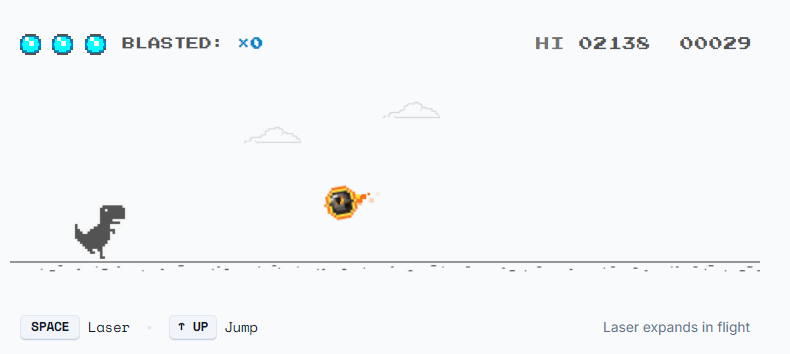
That question gave birth to SaveDino↗, an open-source platform that wraps serious astronomical sky surveys in playful arcade mechanics and procedural audio.
1. Deconstructing and Rebuilding the Arcade Runner
The engine behind SaveDino is a custom HTML5 canvas runner inspired by the classic offline browser game, updated with modern web standards and orbital hazards.
Delta-Time Physics and Frame Independence
A classic pitfall in browser game development is tying sprite displacement directly to
requestAnimationFrame ticks without time delta scaling. On a 60Hz screen, your dinosaur moves at a sensible pace. On a 144Hz or 240Hz gaming display, your dinosaur achieves low-Earth orbit before you can blink.To ensure uniform physics across ancient school laptops and high-refresh monitors alike, SaveDino normalizes every simulation tick with delta time ():
⟨/⟩TYPESCRIPT
27 lines1
interface PhysicsState {
2
x: number;
3
y: number;
4
vy: number;
5
isGrounded: boolean;
6
gravity: number;
7
jumpVelocity: number;
8
}9
10
function updateDinoPhysics(state: PhysicsState, dt: number, isJumpPressed: boolean): void {
11
// Apply gravity curve
12
if (!state.isGrounded) {
13
state.vy += state.gravity * dt;
14
state.y += state.vy * dt;
15
16
// Detect ground collision
17
if (state.y <= GROUND_LEVEL) {
18
state.y = GROUND_LEVEL;
19
state.vy = 0;
20
state.isGrounded = true;
21
}
22
} else if (isJumpPressed) {
23
// Instantaneous vertical jump impulse
24
state.vy = state.jumpVelocity;
25
state.isGrounded = false;
26
}
27
}Hitbox Math: Forgiving the Player
Nothing induces rage quite like losing a high score because a single invisible pixel clipped the corner of an obstacle. Standard Axis-Aligned Bounding Box (AABB) checks are notoriously harsh on jagged pixel art sprites.
To keep gameplay responsive without feeling unfair, entity hitboxes are scaled with an internal inset factor:
⟨/⟩TYPESCRIPT
20 lines1
interface Hitbox {
2
x: number;
3
y: number;
4
width: number;
5
height: number;
6
}7
8
function checkCollision(a: Hitbox, b: Hitbox, insetRatio: number = 0.15): boolean {
9
const insetX_A = a.width * insetRatio;
10
const insetY_A = a.height * insetRatio;
11
const insetX_B = b.width * insetRatio;
12
const insetY_B = b.height * insetRatio;
13
14
return (
15
a.x + insetX_A < b.x + b.width - insetX_B &&
16
a.x + a.width - insetX_A > b.x + insetX_B &&
17
a.y + insetY_A < b.y + b.height - insetY_B &&
18
a.y + a.height - insetY_A > b.y + insetY_B
19
);
20
}2. Procedural 8-Bit Chiptunes (Zero Audio Files)
Downloading 20 megabytes of stock MP3 audio assets just to play a 40-millisecond jump chirp felt like an engineering crime. In SaveDino, every single sound effect is generated purely through mathematical oscillators using the Web Audio API.
| Signal Stage | Web Audio Node | Waveform / Parameters | Functional Role |
|---|---|---|---|
| Clock / Context | AudioContext | Hardware Sample Rate (44.1kHz / 48kHz) | Root clock managing audio graph timing and scheduling |
| Tone Generator | OscillatorNode | Square and Triangle waves | Generates crisp 8-bit harmonic chiptune frequencies |
| Amplitude Envelope | GainNode | Exponential Ramp () | Shapes instantaneous attack and percussive decay |
| Audio Output | AudioDestination | Direct Hardware Speaker Line | Renders synthesized waveforms with zero latency |
Why Synthesize Audio in Code?
- Zero Bandwidth Overhead: No asset fetching, zero network latency, and instant playback on first user interaction.
- Dynamic Frequency Scaling: Pitch and modulation depth shift in real time based on game speed and milestone streaks.
- Authentic 1989 Vibes: Raw square and triangle waves produce nostalgic 8-bit harmonics without compression artifacts.
The Procedural Synth Engine
Here is the synthesizer class responsible for live audio synthesis:
⟨/⟩TYPESCRIPT
64 lines1
class ChiptuneSynth {
2
private ctx: AudioContext | null = null;
3
private isMuted: boolean = false;
4
5
private initContext(): AudioContext {
6
if (!this.ctx) {
7
const AudioCtx = window.AudioContext || (window as unknown as { webkitAudioContext: typeof AudioContext }).webkitAudioContext;
8
this.ctx = new AudioCtx();
9
}
10
if (this.ctx.state === 'suspended') {
11
this.ctx.resume();
12
}
13
return this.ctx;
14
}
15
16
public playJumpSound(): void {
17
if (this.isMuted) return;
18
const ctx = this.initContext();
19
const now = ctx.currentTime;
20
21
const osc = ctx.createOscillator();
22
const gain = ctx.createGain();
23
24
osc.type = 'square';
25
// Frequency ramp upward (150Hz -> 600Hz)
26
osc.frequency.setValueAtTime(150, now);
27
osc.frequency.exponentialRampToValueAtTime(600, now + 0.12);
28
29
// Fast decay envelope
30
gain.gain.setValueAtTime(0.15, now);
31
gain.gain.exponentialRampToValueAtTime(0.001, now + 0.12);
32
33
osc.connect(gain);
34
gain.connect(ctx.destination);
35
36
osc.start(now);
37
osc.stop(now + 0.12);
38
}
39
40
public playScoreMilestone(): void {
41
if (this.isMuted) return;
42
const ctx = this.initContext();
43
const now = ctx.currentTime;
44
45
// Two-tone arpeggio fanfare
46
const freqs = [587.33, 880.00]; // D5, A5
47
freqs.forEach((freq, idx) => {
48
const osc = ctx.createOscillator();
49
const gain = ctx.createGain();
50
51
osc.type = 'square';
52
osc.frequency.setValueAtTime(freq, now + idx * 0.08);
53
54
gain.gain.setValueAtTime(0.12, now + idx * 0.08);
55
gain.gain.exponentialRampToValueAtTime(0.001, now + idx * 0.08 + 0.1);
56
57
osc.connect(gain);
58
gain.connect(ctx.destination);
59
60
osc.start(now + idx * 0.08);
61
osc.stop(now + idx * 0.08 + 0.1);
62
});
63
}
64
}3. Full-Stack Architecture and Arcade Design System
While the retro runner captures attention, the platform serves as a coordination portal for real citizen science asteroid search campaigns across schools and research groups.
| Architectural Layer | Component Name | Technology Stack | Key Responsibilities |
|---|---|---|---|
| Client Game Engine | Arcade Canvas | HTML5 Canvas & TypeScript | 60 FPS delta-time game loop and collision response |
| Audio Synthesizer | Chiptune Engine | Web Audio API | Procedural sound generation without audio files |
| Design System | Arcade HUD Tokens | Tailwind CSS & Google Fonts | Press Start 2P, Space Mono, tactile shadows, and themes |
| Backend & APIs | Squad Platform | Next.js App Router | Campaign registration, squad listings, and telemetry |
| Data & Auth | Persistence Engine | Better Auth & Prisma ORM | Passwordless magic-link authentication and database |
Arcade-Tech Aesthetics
The user interface balances arcade nostalgia with data density:
- Typography Hierarchy:
Press Start 2Pfor arcade scores and headers,Space Monofor technical coordinates and mission IDs, andInterfor document text. - Physical Push-Button Feel: Hard CSS drop shadows (
shadow-arcade) with 2px click offsets to simulate physical micro-switches. - Day and Night Modes: Smooth switching between desert daylight and deep space night palettes without hydration flicker.
4. Connecting the Arcade to Real Asteroid Discovery
The ultimate goal of SaveDino is guiding students from casual gaming into real astronomical research:
- Pan-STARRS Survey Ingestion: Observatories on Haleakala in Hawaii capture wide-field FITS survey image sets.
- Squad Formation: Students and amateur astronomers assemble research squads on SaveDino to claim image batches.
- Astrometrica Analysis: Volunteers blink successive telescope exposures to spot moving near-Earth objects against the background starfield.
- Minor Planet Center Submission: Validated candidate coordinates are submitted to the Minor Planet Center (MPC) under the International Astronomical Union, earning students verified discovery credits.
5. Lessons Learned
Building SaveDino proved that technical precision and playful design can coexist happily:
- Constraints Breed Cleaner Code: Replacing audio files with procedural oscillators eliminated asset loading states entirely and resulted in instant responsiveness.
- Gamification Democratizes Science: Astrometry and orbital mechanics can feel intimidating. Wrapping real data pipelines in an approachable arcade wrapper encourages students who might otherwise never explore astrophysics.
- Open Source Everything: The codebase is public on GitHub↗, allowing astronomy clubs worldwide to run their own localized campaigns.
Project Links
- Live Platform: savedino.sedssl.org↗
- Scientific Credits and Attributions: savedino.sedssl.org/credits↗
- GitHub Repository: github.com/Thawshi-Srikanth/savedino↗